Sunnyline: A Font That Adds Joy to Your Web Design
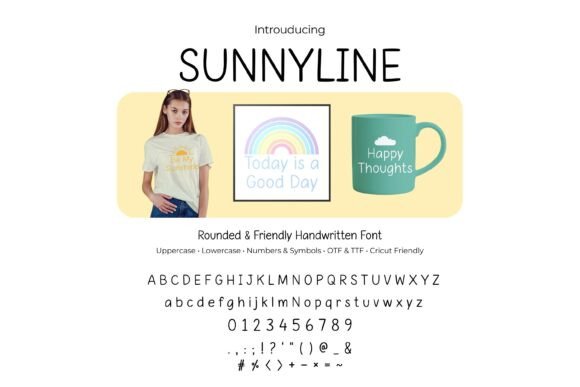
Recently, I was working on a boutique online store’s homepage. The client wanted something warm, inviting, and modern. They had a clear vision of a brand that felt friendly yet professional. As I explored different typefaces, I came across Sunnyline—a rounded, handwritten script font with a cheerful vibe. It immediately caught my eye, not just for its aesthetic appeal, but for how it could elevate the overall user experience.
The First Impression: Testing in a Hero Section
I started by testing Sunnyline in the hero section of the homepage. Placing it over a light background image of a cozy workshop, I noticed how it brought a sense of warmth and approachability. The rounded shapes and gentle curves made the text feel more personal, almost like a handwritten note from the brand itself. It wasn’t too bold or too soft—just right for creating a welcoming atmosphere.
One of the first things I considered was readability. Since the hero section is often the first thing users see, the font needed to be legible at a glance. Sunnyline performed well in this regard, even when scaled down slightly for mobile views. Its clean lines and consistent stroke weight helped maintain clarity without sacrificing character.
Using Sunnyline Across Different Layouts
Sunnyline is versatile enough to work in various parts of a website. For headers and section titles, it adds a touch of personality without overwhelming the content. On landing pages, it can be used for call-to-action buttons, where its friendly tone encourages clicks. In blog headers, it creates a visual anchor that draws the eye and sets the tone for the article.
For a creative portfolio site, Sunnyline can serve as both a logo font and a decorative accent. When paired with a sans serif body font, it creates a nice contrast that highlights the designer’s unique style. I’ve also seen it used effectively in course sales pages, where it helps convey a sense of creativity and approachability.
Readability on Mobile and Responsive Layouts
As a web designer, I always consider how a font will perform on mobile devices. Sunnyline holds up surprisingly well, especially when used in larger sizes for headings. However, I recommend using it sparingly on smaller elements like buttons or form labels, where it might become less legible at very small sizes.
When placing Sunnyline over an image banner, it’s important to ensure sufficient contrast. Light backgrounds work best with darker text, while dark backgrounds require lighter text to maintain readability. I also found that using a subtle drop shadow can help the text stand out against busy or textured images.
Font Pairing and Brand Identity
Pairing Sunnyline with other fonts can enhance its effectiveness. For a modern look, I often pair it with a clean sans serif font like Montserrat or Inter for body copy. This combination balances the playful nature of Sunnyline with the professionalism of a sans serif, making it suitable for both editorial and commercial websites.
If you’re aiming for a more editorial or packaging design feel, pairing Sunnyline with a serif font like Georgia or Playfair Display can add depth and sophistication. This is especially effective for blogs, magazines, or brands that want to convey a sense of tradition and quality.
Technical Considerations Before Implementation
Before implementing any new font, it’s crucial to check its technical specifications. Sunnyline comes with several weights and alternates, which makes it adaptable to different design needs. It also supports multiple languages, which is a plus for international websites.
Make sure to verify that the font is available as a webfont and includes the necessary file formats (like WOFF2 and TTF). Also, check the licensing terms to ensure it’s appropriate for your project. Whether you’re building a landing page, a digital brand kit, or a campaign page, having the right permissions is essential.
Final Thoughts on Using Sunnyline
Sunnyline is more than just a font—it’s a tool for creating a positive user experience. Its cheerful personality makes it ideal for brands that want to feel approachable and authentic. From hero sections to call-to-action buttons, it adds a layer of warmth that can make a difference in how users perceive your brand.
When designing for the web, every choice matters. Choosing the right font can influence readability, trust, and engagement. Sunnyline offers a unique blend of charm and functionality that makes it a valuable addition to any designer’s toolkit. Whether you’re building a boutique store, a coaching website, or a creative portfolio, Sunnyline has the potential to bring your vision to life with a smile.